Trade Projector
Trade Projector is a MetaTrader 5 Expert Advisor for planning a manual trade directly on the chart. It combines an entry reference, draggable stop-loss and take-profit levels, estimated monetary risk and reward, fixed-lot or risk-based sizing, and optional market or pending-order execution.
It makes the trade plan visible before an order is placed. It is not a signal service, automated strategy, performance guarantee, or investment recommendation.
View Trade Projector on the MQL5 Marketplace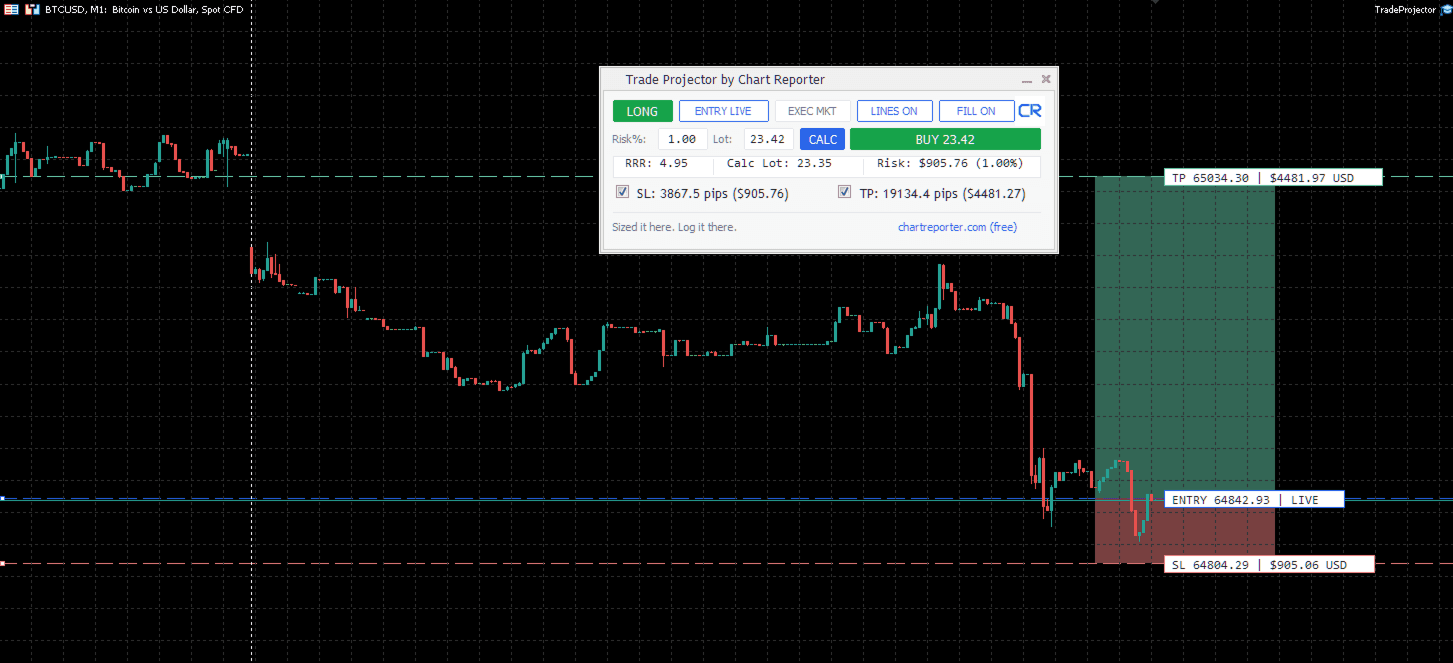
What it does
- Shows a chart-native control panel with live risk, reward, reward-to-risk ratio, and calculated lot size.
- Draws draggable Entry, Stop Loss, and Take Profit levels, with optional shaded risk and reward zones.
- Supports a live market entry reference or a manually placed entry level.
- Supports market execution and pending-order execution.
- Lets you keep a fixed lot or calculate a lot from account balance, risk percentage, and stop distance.
- Remembers the panel position and settings for the current symbol and chart.
Install and attach
- Copy
TradeProjector.ex5into the terminal'sMQL5/Expertsfolder. - In MetaTrader 5, refresh the Navigator if needed.
- Drag Trade Projector onto the chart you want to plan from.
- Enable Algo Trading only when you intend to use the order-placement controls.
- Confirm the symbol, account, contract specifications, and input defaults before placing an order.
The title bar reads Trade Projector by Chart Reporter. When minimised, it remains as a full-width title bar beneath the standard One Click Trading controls.
Plan a trade
- Choose LONG or SHORT.
- Choose ENTRY LIVE for the current executable market side (Ask for long setups and Bid for short setups), or ENTRY MAN to drag the Entry line to a planned price.
- Drag the SL and TP lines to your intended invalidation and objective levels.
- Enter the intended Risk % or a fixed Lot value. Select CALC to copy the displayed risk-based lot size into the Lot field.
- Check the displayed stop distance, target distance, R:R, and estimated monetary risk.
- Choose EXEC MKT for market execution or EXEC PEND for a pending order at the manual entry level.
- Independently check the ticket details in MT5 before confirming any order.
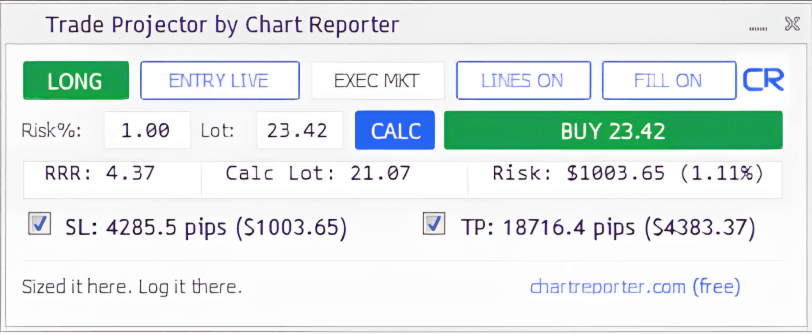
Panel controls
| Control | Purpose |
|---|---|
| LONG / SHORT | Sets the trade direction and recalculates the projection around the active entry reference. |
| ENTRY LIVE / ENTRY MAN | Switches between the current-market and manually dragged entry reference. |
| EXEC MKT / EXEC PEND | Chooses market or pending-order execution. A pending entry effectively at market is routed to market execution. |
| LINES ON / OFF | Shows or hides Trade Projector chart annotations. |
| FILL ON / OFF | Shows or hides shaded risk and reward zones. |
| Risk % / Lot / CALC | Sets risk-based sizing, fixed sizing, and copies the calculated lot into the active Lot field. |
| SL / TP checkboxes | Enable or disable the corresponding level for order placement and annotations. |
| BUY / SELL | Submits the selected market or pending order using the panel's current settings. |
Sizing and order safety
The calculated lot is an estimate based on your account balance, selected risk percentage, stop distance, and the symbol contract details supplied by your terminal. It does not replace checking margin, spread, stops level, volume limits, or the final order ticket.
Use CALC only after verifying that the entry and stop are intentional. A fixed Lot remains under your control until you replace it with the calculated value. Before placing any order, confirm the symbol, direction, volume, entry, stop, and target in MetaTrader 5.
Troubleshooting
The panel or chart levels are not visible
Confirm the EA is attached to the intended chart, the Navigator is using the current TradeProjector.ex5 file, and the selected line colours contrast with the chart background. Remove and reattach the current binary if the terminal is using an older copy.
The calculated lot is unexpected
Check the account balance, Risk %, stop distance, and the broker's symbol contract specifications. Lot sizing can vary by instrument because tick value, contract size, minimum volume, and volume step differ between brokers.
A pending order did not remain pending
Pending execution requires a manually placed entry that is away from the executable market. An entry effectively at market is routed to market execution.
Responsible use and support
Trade Projector is a charting and order-planning aid, not a trading system. It does not account for every execution condition, including spread, slippage, news, liquidity, broker restrictions, or account risk. Use an independently defined trading plan and verify every decision against the current chart and broker conditions.
When requesting support, include the terminal build, broker, symbol, chart timeframe, Trade Projector version, inputs, and any relevant Experts or Journal messages.
Version history
Current release
The current Marketplace release provides chart-native trade planning, draggable entry/stop/target levels, fixed and risk-based sizing, optional risk/reward shading, and market or pending-order controls. Refer to the MQL5 Marketplace listing for the current version and release notes.